


Trulia Rent Apartments & Homes
4.720.22K Reviews
App Specs
- Version
- 11.46.0
- Updated On
- License
- Free
- Downloads
- 5,000,000+
- Developer
- Trulia (Owned by ZillowGroup)
- Categories
- House & Home
- Platform
- Android, iOS
Screenshots
 Analysis by AppCompare
When I look for a rental, I want more than a stack of addresses. I need to understand how a place fits into my daily routine, what the surrounding area feels like, and whether a listing is worth following up on. Trulia Rent Apartments & Homes gives that search a map-centered starting point, which can make a large or unfamiliar market easier to explore. It is a free House & Home app from Trulia, with a 4.7 average from around 99,000 ratings and over 5 million installs. I see it as a useful discovery tool, not a substitute for checking a property and its terms directly.
What I would check before relying on a listing
Rental searches involve personal decisions, so I pay attention to what the app lets me review and what I still need to verify myself. A polished photo gallery or a confident description can help me decide whether to investigate, but neither proves that a home is available or that every detail is current. I would use Trulia to build a shortlist, then confirm the rent, availability, lease conditions, and viewing arrangements with the relevant contact before making plans around them.
The neighborhood information is useful context, not a personal guarantee of safety or comfort. A crime-rate display or local perspective can give me questions to ask and places to look more closely; it cannot tell me how I will feel walking home at a particular hour or whether a route works for my household. I would combine what I see in the app with an in-person visit, local research, and a realistic look at the commute. That distinction matters most when I am moving somewhere I have never lived.
Making a shortlist that helps with the decision
I would avoid saving every listing that looks attractive. Instead, I would use the saved-list approach to keep only homes that meet a few non-negotiables, then compare them against the same questions: Does the location suit my everyday routes? Is the stated rent within my planned budget? Do the photos and description give me enough reason to arrange a viewing? This turns a scroll session into a manageable set of next steps rather than a collection of tempting possibilities.
A useful trick is to separate “good on paper” from “good for my routine.” A home can look appealing but add a difficult trip to work, childcare, or regular errands. I would check the map with those destinations in mind and treat nearby schools, parks, or transit as prompts for further checking, not as proof that a particular option is right for me. The map is strongest when I use it to notice trade-offs early, before I become attached to the interior photos.
Search habits, alerts, and practical limits
Notifications can help when I am actively looking, but I would keep my criteria focused enough that new-match alerts remain useful. If my location or budget is too broad, a stream of possibilities may add noise instead of saving time. If I make the search too narrow at the beginning, I could overlook a nearby area or a different property type that would work. I would start with the essentials, review what comes back, and adjust deliberately rather than treating the first set of filters as final.
There is also a trade-off in relying on an app for a fast-moving rental search: a listing that catches my eye may need a quick follow-up, while details can still require confirmation. Trulia can help me notice options and organize them, but I would not assume that a notification reserves a property or guarantees a response. For a time-sensitive move, I would contact promising listings promptly and keep a separate note of who I have contacted and what still needs an answer.
Worth Reading Before You Choose

Flipboard Shows What News Apps Must Do Beyond the Feed

Switching to Android Auto Means Rethinking Your Driving Routine

Google Calendar Makes a Crowded Week Easier to Manage

Ludo King Makes the Most of the Minutes Between Plans

Baby Panda World Brings Quick Play to Modern Phones, but Its Game Library Feels Busy

ESPN’s Live Game View Makes Following Close Games Easier
Who is likely to get the most from it?
I think the app makes the most sense for renters who want to explore neighborhoods visually, compare possible locations, and keep a shortlist in one place. It is especially handy when I am new to an area and need to understand how homes sit relative to the places I visit. A first-time renter may also appreciate having map context alongside property details, as long as they remember that a listing is the beginning of the process rather than the final word.
It is less suited to someone who expects the app alone to verify a landlord, guarantee that a home is available, or settle every question about a lease. Renters who prefer a broad sweep across several services may want to check other rental platforms too, since no single app should be treated as the complete market. And if I already know the exact building or neighborhood I want, contacting a property manager directly may be more efficient than browsing a wider set of results.
Getting Started with Trulia
First things first, downloading the app is a breeze. Whether you're on Android or iOS, the app is just a quick search away in your respective app store. Once you’ve got it installed, the setup is intuitive. You’re greeted with a clean interface that practically whispers, "Hey, let’s find your dream home together!"
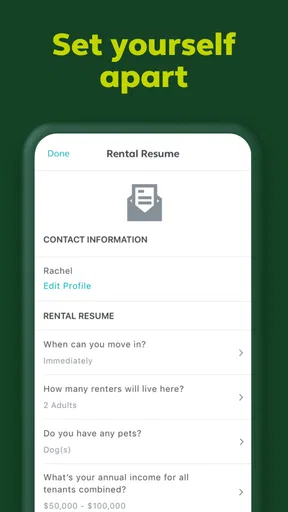
Setting up your profile is straightforward. You can personalize your search preferences, whether you’re looking for a cozy one-bedroom or a sprawling family home. The app asks for your preferred location, budget, and necessary amenities. It's like ordering your perfect latte but for houses!
Exploring Features
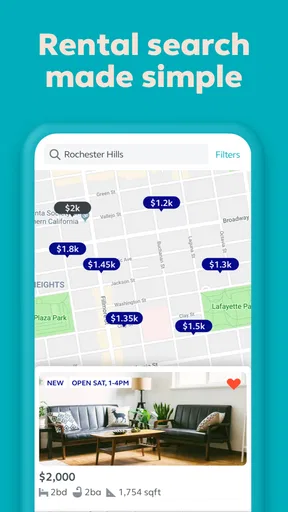
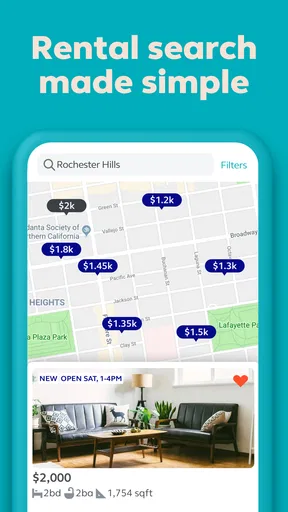
Now, here’s where Trulia Rent Apartments & Homes shines. The app is packed with features that make finding a rental as smooth as possible. The map-based search is a standout – you can literally see where properties are located in relation to schools, parks, and public transport. It’s like having Google Maps meet real estate, and they’re getting along fabulously.
There’s also a delightful feature that shows local crime rates. Safety first, right? You can check neighborhood vibes with ease, ensuring your new home is in a place where you’ll feel comfortable and secure.
A Peek Inside the Listings
When you tap on a listing, you’re hit with a wealth of information. High-quality photos give you a virtual tour of the property, and detailed descriptions provide insights that go beyond the basics. It’s like having a realtor at your fingertips, explaining every nook and cranny.
Another neat feature is the ability to save your favorite listings. You can create a shortlist of potential places, making it easier to compare options side-by-side. It’s perfect for people like me who love to weigh every option before making a decision.
User Experience and Design
The user interface is refreshingly minimalistic. Navigation is a breeze, with everything neatly organized into tabs. It’s not cluttered with ads or unnecessary fluff, which makes spending time on the app enjoyable rather than frustrating.
The app also offers notifications for new listings that match your criteria, so you’ll never miss out on a potential gem. It’s like having a personal assistant scout out the best deals for you.
Privacy, choices, and the moments that deserve care
Rental browsing can involve sensitive decisions even before an application is submitted: where I live, what I can afford, and which locations I consider. I treat those details with care and make a habit of reviewing the app’s current permissions and privacy information on my device and in its store page before sharing more than I need to. Those controls and disclosures can change over time, so I would check the current versions rather than rely on assumptions based on an older setup.
In practical terms, I would keep my search preferences focused on what helps me find a home and avoid entering sensitive personal or financial details into a listing conversation unless there is a clear reason and I have verified who I am speaking with. I would also read any request for information carefully, especially if it arrives before I have confirmed the property and contact. This is sensible caution for rental searches generally; it is not a claim about a particular Trulia permission or data practice.
The app is rated for Everyone, and its current version is 11.39.1. Trulia was released on September 28, 2011, and supports Android 9 or later. Those details help me judge basic compatibility, but they do not answer whether a particular listing is suitable or whether my device settings are configured the way I want. I would review notification and location choices on my own device and enable only what makes the search more useful to me.
A realistic way to use the app during a move
Imagine I have a few weeks to find a place near a new job. I would begin with the likely commute area and a budget I can genuinely manage, then scan the map for options rather than fixating on one street. I would save a small number of plausible homes, compare their location and listing details, and note which questions each one raises. If the map suggests a longer trip than I expected, I can drop that option before spending time arranging a viewing.
After that first pass, I would revisit the shortlist at a calmer moment and check whether each home still meets my priorities. I would contact the most promising listings, confirm availability and important terms, and arrange viewings where possible. The app helps me keep the search organized, while my own notes and follow-up conversations handle the parts a map and listing page cannot settle. That division of labor is what makes the tool practical rather than overpromising.
How it compares with other ways to rent
Compared with searching through general classified ads, Trulia’s emphasis on map context and neighborhood information makes it easier for me to think about the area as well as the unit. A property-focused site can also be useful for browsing photos and descriptions, but the best choice depends on where I am searching and how much coverage I need. I would check another rental service when I want to broaden the pool, and I would go directly to a property manager when I already know the building or have a specific question that needs a direct answer.
No comparison removes the need to verify details. I would use multiple sources when the market is competitive, but I would avoid sending applications or personal information indiscriminately just to be first. The more services I consult, the more important it becomes to track which listing came from where and whether the contact and terms match. For me, Trulia is most valuable as a visual search and organizing layer, not as the sole authority on a rental.
What Makes Trulia Stand Out?
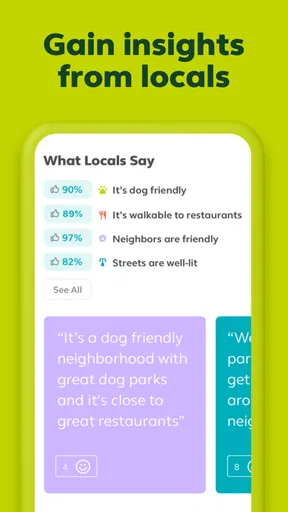
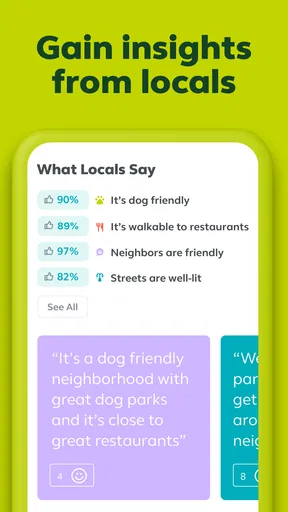
One of the things I love about Trulia is its commitment to providing more than just listings. The app offers comprehensive neighborhood guides, which include insights from locals. You get a feel for the area – is it lively and bustling, or quiet and serene? These insights are invaluable, especially if you’re moving to a new city.
Moreover, the app’s affordability calculator is a lifesaver. It helps you figure out what you can realistically afford, taking into account factors like income, monthly expenses, and more. It’s a smart feature that ensures you’re not biting off more than you can chew.
Final Thoughts
All in all, Trulia Rent Apartments & Homes is a fantastic tool for anyone looking to rent. It’s user-friendly, packed with features, and offers a holistic view of potential new homes and neighborhoods. Whether you’re a seasoned renter or a first-timer, this app makes the process less daunting and more exciting.
If you’re ready to embark on your next rental adventure, give Trulia a try. It might just make you look forward to house hunting, which is saying something!
My cautious recommendation is to use Trulia when you want a clear way to explore rental locations and keep promising options together, while treating its information as a starting point that needs real-world follow-up. I would skip it as my only search method if I needed confirmed availability, direct answers about a lease, or a complete view of every rental in an area. Used with sensible privacy choices, careful comparisons, and direct checks before committing, it can make the early part of a move feel more manageable without asking me to hand over my judgment.
Pros
- User-friendly interface for easy navigation.
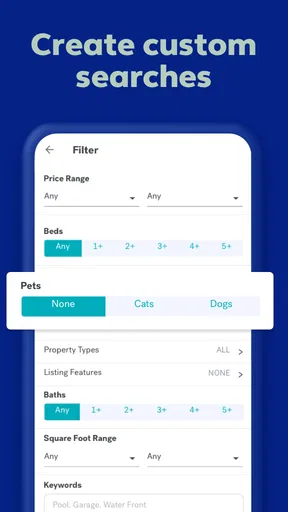
- Comprehensive search filters for precise results.
- Real-time alerts for new listings.
- High-quality images for better property insights.
- Interactive map for location-based searches.
Cons
- Limited international property listings.
- Occasional outdated listing information.
- Requires account for full feature access.
- Ads can be intrusive at times.
- Some features need a stable internet connection.
FAQs for Trulia Rent Apartments & Homes
What features does Trulia Rent Apartments & Homes offer?
Trulia Rent Apartments & Homes provides a comprehensive platform for finding rental properties. It offers detailed property listings with high-resolution photos, neighborhood insights, and user reviews. Additionally, users can access crime maps, school ratings, and commute times, making it easier to choose the perfect rental. Customizable search filters and alerts ensure you never miss out on new listings.
Is Trulia Rent Apartments & Homes free to use?
Yes, Trulia Rent Apartments & Homes is free to download and use. The app provides extensive access to property listings, neighborhood information, and various tools without any cost. However, some features may require registration or an account to use, but there are no hidden fees or in-app purchases.
Can I contact property managers directly through the app?
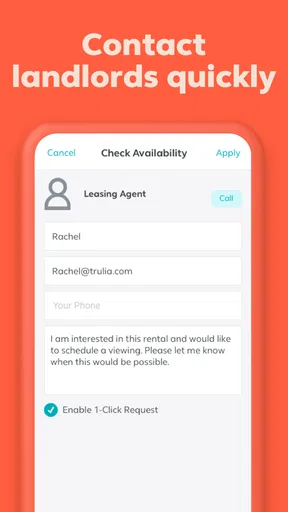
Absolutely. Trulia Rent Apartments & Homes allows users to contact property managers or landlords directly from the app. Each listing includes contact information or a direct messaging feature, enabling seamless communication. This ensures you can ask questions, schedule viewings, and clarify details directly with the property manager.
How reliable is the neighborhood information provided by Trulia?
Trulia is known for its reliable and detailed neighborhood information. The app offers crime maps, school ratings, and local amenities, sourced from reputable databases and user reviews. This data helps users make informed decisions about where to live, ensuring transparency and confidence in choosing a neighborhood.
Does Trulia Rent Apartments & Homes offer support for users?
Yes, Trulia provides robust customer support for its users. Whether you need technical assistance or have questions about listings, support is available through the app’s help section. Users can access FAQs, contact forms, and sometimes direct chat with support representatives to resolve any issues promptly.


